Suite Studios — A SaaS Future for Baked Studios

This is an overview of how our pipeline could be improved by adopting Suite Studios cloud storage software.
Introduction
At the core of every VFX pipeline is thoughtful consideration of the end user experience. At Baked, our users are artists, coordinators, supervisors and producers. A good pipeline needs the following qualities...
- Consistency — repeatable workflows and continuity in relation to application UX design, production management software integrations, render processes and workstation disk images.
- Security — follows best practices to the best of our knowledge - in this case, ideally MPA TPN assessed.
- Efficiency — there’s no place for extensive manual copying and sorting. No one should have to sift through the filesystem.
- Performance — speedy, snappy, however you want to put it, the pipeline should have low latency and should present users with the broadest range of tools and resources available.
- Reliability — the pipeline cannot be glitchy, buggy or impede the working process in anyway.
Let’s start with the workstation. Ideally workstations have a shared image that gets copied from one environment to the next to provide a simple, consistent working experience for users.

Now we need a pipeline. Baked has gone with ShotGrid’s Pipeline Toolkit as the foundation for our pipeline. The user-friendly integrations with our primary production management software, as well as support for most digital content creation software, make this toolkit a huge help and an essential starting point. Using the toolkit, Baked and our partners can build things like ingest tools, export tools, environment specific tools, plugin managers and plenty other creative integrations that further our ability to meet the standards set for a good pipeline.

One of the basic requirements of ShotGrid’s Pipeline Toolkit is a storage location to work off of. The toolkit looks for a specified file path to read and write files based on the operating system, e.g Windows: P:\YOUR_DRIVE, MAC: /Volumes/YOUR_DRIVE. These storage locations can be set on a per-project basis, but it’s beneficial to keep things consistent by choosing one location to point to — enter BASKET.

BASKET is a shared network access storage and media management server on-premise in Baked’s office in Los Angeles. It’s an EVO model made by Studio Network Solutions. It does what it needs to do as a centralized location to read and write media files coming from workstations running digital content creation software.

⚠️The Problem
Baked is a multi-location company with employees spread out across the country. BASKET is in Los Angles, not in the cloud, not in our offices in New York or Montana, not in our client’s offices either (but we’ll come back to that later). If I’m working in New York, I can’t specify BASKET as the toolkit storage location because I’m not connected to BASKET there.
Solution 1
Remote Desktop — the first step in addressing the problem of getting people connected to BASKET from afar, is to move people closer to BASKET — duh! Remoting in using an application like Jump Desktop lets someone in New York, Montana or elsewhere connect to a workstation on-premise in Los Angeles that is a part of the network that includes BASKET.

A quick comparison of Remote Desktop solutions:
| Jump Desktop | NICE DCV | Parsec | |
|---|---|---|---|
| Integration with AWS | ❌ | ✅ | ❌ |
| Price | 16/user/month | 13/desktop/month | 30/user/month |
| Good Performance | ✅ | ✅ | ❌ |
| Linux Support | Sort of | ✅ | In Progress |
This is a fast, efficient, and secure way of working. But what happens when we run out of workstations in Los Angeles? Or we have good reasons to want to work locally but in another location? Suppose we scale up somehow — whether another location, another server or adding something in the cloud… in doing so, how do we adhere to ShotGrid’s storage location requirement?
Solution 2
Symlinks — Symlinks let us trick ShotGrid by replicating the specified storage location file path while actually pointing to another location on a local machine. So for example, while the shared storage available in New York might be /Volumes/SNS/, a symlink lets us make that storage also accessible locally from /Volumes/BASKET/. Great! But with multiple symlinks, and essentially multiple BASKETS around the country, we need to sync them so that assets saved to one “BASKET” can be accessed by ShotGrid toolkit from other locations.

The absolute UNC file path of the storage stays the same, but as far as ShotGrid is concerned, there’s another “BASKET” in that location.
Solution 3
Sync Solutions — Resilio, Syncthing, and Signiant Jet are all sync solutions that scan for changes in one location and transfer files back and forth to keep multiple servers in sync. This part is pretty straightforward but there are a few things we need to consider: speed, reliability and sync-ability with the cloud. Let’s look at Syncthing, it’s supposed to be fast, it has transfer rules that make it quite reliable, but it doesn’t sync with object storage in the cloud. However it is open source and free, so that’s a great plus. Each sync solution comes with its pros and cons. For now let’s use Syncthing, but we need a cloud workflow for when things get busy and we don’t have enough hardware to support the resource demands — is there another way to ‘sync’ these servers?

I’ve added the FARM and AWS Thinkbox parts of our workflow in the above diagrams. These are important aspects of our workflow that we’ll talk about in a moment.
Here’s a brief comparison of different sync solutions:
| Speed | Price | Cloud Compatible | As Fast as File System | |
|---|---|---|---|---|
| Syncthing | SLOW | Free | ❌ | ❌ |
| Signiant Jet | FAST | Expensive | ✅ | ❌ |
| Resilio | FAST | Mid Range | ✅ | ❌ |
Solution 4
Locally Accessible and Mountable Cloud Storage - maybe making a server the place you direct ShotGrid to in the first place is a mistake. Instead, one option to consider is a locally mounted cloud bucket. This cloud bucket would be the single source of truth that caches to local storage in these different geographic and cloud places. That’s what Lucidlink and Suite do. Let’s look at another diagram.

Notice how the other two BSKTs are now called just by the make and model of the machine, we don’t need symlinks anymore.
In this diagram, you can see Suite plays a pretty heavy role. It’s sitting in the middle because in this scenario, ShotGrid is directed to Y:\Suite or /Volumes/Suite/ as its primary storage location. The storage servers themselves: SNS, SNS and SYN are now for cacheing and slow storage. No more symlinks, or syncing needed. Suite also integrates with the cloud so that workflow is shown above as well.
Here’s a brief comparison of Suite and Lucidlink — just the dealbreakers:
| Suite | Lucidlink | |
|---|---|---|
| Price | 75/TB + 10/user | 80/TB + 10/user |
| Responsive Team | ✅ | ❌ |
| Easy install | ✅ | ❌ |
| Proven Track Record | ❌ | ✅ |
| Faster Speed | ✅ | ❌ |
| Transactional Writes | ✅ | ❌ |
And here’s a brief comparison of Suite to a sync solution like Resilio:
| Suite | Resilio | |
|---|---|---|
| Technology | FUSE, s3fs, proprietary acceleration | Bit Torrent |
| Method | Cloud | P2P |
| Streaming/cacheing | Download/upload | |
| Metadata | Independent | Bunched |
| Type | File system | Application |
| Speed | Instant, then stream | Wait, then work |
| Price | e.g 13k/year | 7k/year |
| Capacity | e.g 15TB on Cloud | 500TB of monitored storage |
| Max throughput | 10-24gbps (1gbps with our WiFi) | 2gbps (1gbps with our WiFi) |
This cloud to local cacheing workflow can be powerful but there are some things we need to figure out.
-
Most of the time, our core storage option is going to be barraged with read and write requests for large image sequences. If Suite is cloud storage, we need to make sure things get rendered locally first and then make their way to the cloud. It would be frustrating if render speeds were capped at our upload speeds.
- Suite does indeed cache locally on render and so would not need to be slowed down to match upload speeds.
-
Going off of that, we have a render farm. How do we configure Suite to be a target location for renders coming off the farm? Do we have to install Suite on every render node? Is that possible?
- Suite can be configured to work with a render farm without needing to be installed on each individual node.
-
Continuing off of that, does Suite work with cloud rendering?
- The same workflow for on-premise render farms can be applied to cloud-based render farms.

There’s a way to connect the dots here, and Suite solves what could have been a huge problem: internet speeds dictating render times and capacity rather than LAN ethernet cables. The cacheing goes both ways, down from and up to the cloud.
If there wasn’t a way to do this, we’d need another approach that allowed our NAS and LAN ecosystems to function properly, but also sync to other servers as well as cloud object storage. Signiant Jet and Resilio would come back to the table.
O.K cool, so we’ve solved a lot of issues by using Suite. What else needs to happen to build infrastructure for a solid pipeline?
Solution 5
File Transfer — I said earlier that we’d come back to the fact that BASKET isn’t in our client offices. That’s true, and this is where we need a file transfer solution to bring our data to our clients and theirs to us. Preferably a solution that uses a branded UI in the browser and a password protected link. Enter MASV, Media Shuttle, and Suite Connect.
Here’s a brief comparison of MASV, Suite Connect, and Signiant Media Shuttle.
| Suite Connect | MASV | Media Shuttle | |
|---|---|---|---|
| Currently Available | ❌ | ✅ | ✅ |
| Customizable UI | ✅ | ✅ | ✅ |
| API | Unknown | ✅ | ✅ |
| REST API | Unknown | ✅ | ❌ |
| Price | Free w/ Suite | 6k / year | 11k / year |
| Growing Files | Unknown | ✅ | ❌ |
| On-prem Utilization | ❌ | ❌ | ✅ |
| Send as Link | ✅ | ✅ | ❌ |
| Client Portal | ✅ | ✅ | ✅ |
It seems like we’ll be going with MASV for now for file transfers — Suite’s connect project is still in beta, but once it’s available I see no reason not to switch considering it’ll be free with our plan.

Let’s look at some benefits of MASV while we’re on the subject. MASV downloads from the cloud, so while there’s an upload process on our end that might take a moment, from the client’s perspective, things download extremely quickly. I’m going to note here that Suite Connect will be the same.
MASV has a great downloadable app that speeds up file transfers and allows for hot folders and automations. This app is a Media Shuttle killer in my opinion. MASV also has support for “growing folders” which basically means it uploads and sends files that are part of a larger render or stream that’s still in progress. Think sending EXRs to another location while they’re still rendering. We’ll have to look more closely into use-cases but it’s a powerful feature. I’ll note again, that Suite has both features as well; a nice app and a way to stream/upload still-rendering files.
MASV is a transfer solution that uploads your media to the cloud and makes it available for download elsewhere. Suite is exactly the same, but comes with a mountable storage solution we can work off of. MASV will work for us while Suite Connect is still in development, but long term, it’s not really apples to apples.
Solution 6
Mountable Storage for Supervisors and Producers — Aside from replacing a sync solution with cloud integration, and a file transfer solution, Suite has another important place in this pipeline. On the Supervisor and Producer side of things, Suite provides access to hi-res movie and EXR versions of shots that can be easily opened and reviewed via the ShotGrid interface. Anything in the pipeline will be viewable and editable remotely by coordinators, producers and supervisors.

Addition of Remote Supervisors/Producers workflow.
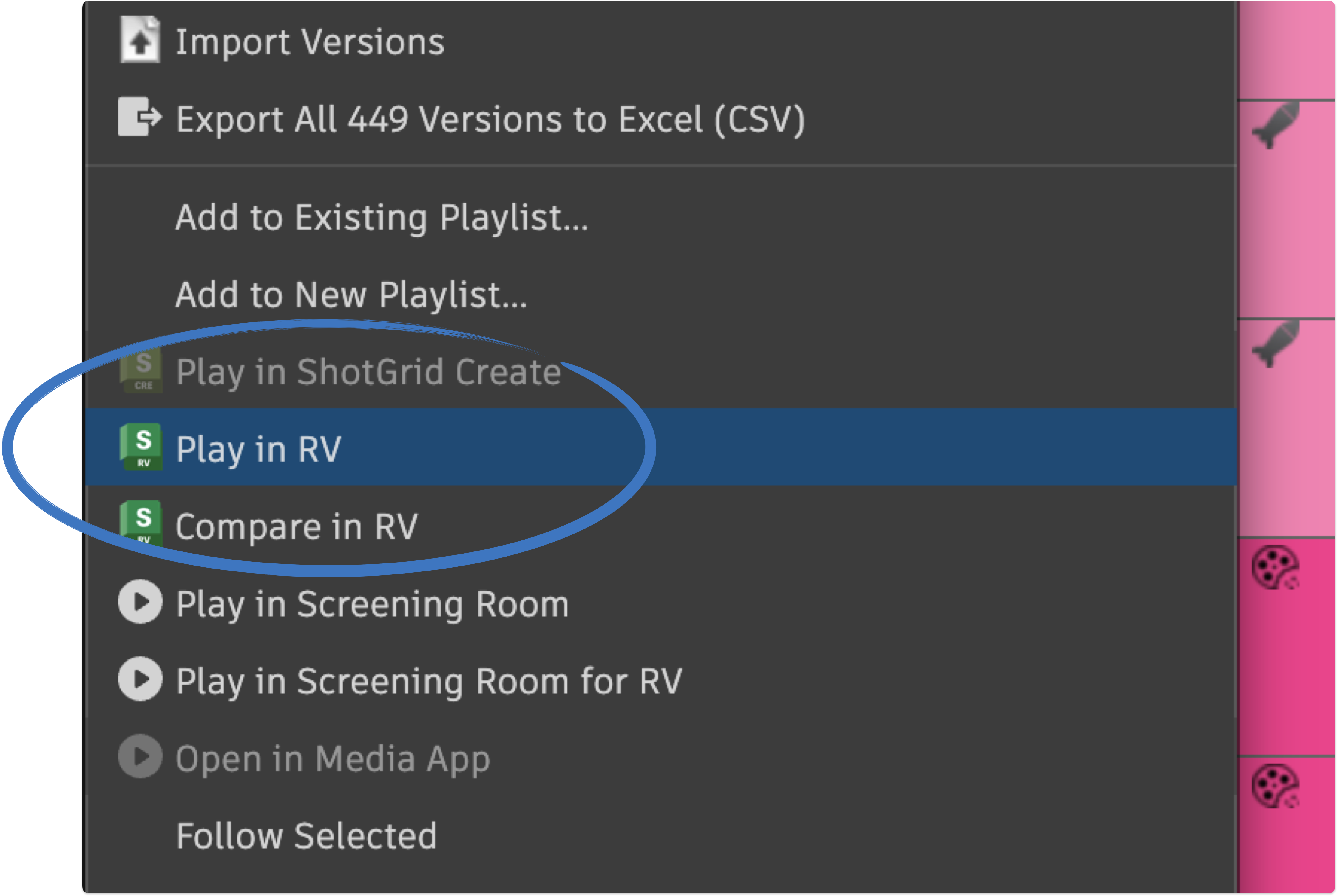
Media is directly loadable from the “path to frames” and “path to movie” fields that direct RV to EXRs and hi-res MOVs respectively. A user could do this on a train for example.

An example of RV playing back EXRs
⚠️The Other Problem
Double Paying for On-Premise and Cloud Storage — one of the issues with this set-up is that we have all this on-premise storage, why go after cloud storage too? Is there any reason to have both? Why bother if Syncthing is available?
Response
We’ll be paying the same for Suite with Suite Connect as we would for Syncthing and Media Shuttle. The only deal breaker in this whole thing is we can’t afford anything other than Syncthing and MASV, in which case, fine that makes sense. Let’s just align on the goal for when we have a more optimal cash flow situation.
Reasons why Suite is a better option than Syncthing & MASV or Syncthing & Media Shuttle:
- One program, one single source of truth.
- One support team
- Price is comparable when counted together with Suite Connect (MS + Syncthing vs Suite/ MASV + Syncthing vs Suite)
- We can understand it and won’t need to consistent configuration and management by IT.
- Reduced reliance on On-Prem - this is good incase of power outages, malfunctions etc
- Access from anywhere with a login.
- Encryption, transactional writes and redundancy.
- Ease of use - it’s super snappy.
- Familiarity - it’s just a mounted drive, we won’t know the difference - it’ll be just like basket but in the cloud too.
- Without Suite, Coordinators, Producers and Supervisors will have to continue to dive into the file system and retrieve stuff by remoting in. This doesn’t align with the criteria set up at the beginning of this document for what a good pipeline should be.
⚠️The Other, Other Problem
Too Much Media to Store on Cloud, will be Too Expensive — TRG was 30TB how on earth will we afford cloud storage for projects that size?
Response
TRG was 10TB in terms of what we’d actually host on cloud, and that’s without DWAB compression, but let’s start there, with a 10TB per big project approach. If we have two Trigger Warnings going at the same time, we’ll have other problems to worry about besides the cost of cloud storage. But let’s say we’re still worried about a 25 TB storage solution on the cloud. That will be about 22k without a discount from Suite. The point of cloud is that it’s extremely flexible. We can scale up (on a month to month basis) from our 1 year commitment of 15TB to 25TB for the work, in which case we’re working with a variable cost i.e money comes in goes up, money going out goes up. And then we can scale back down to 15TB — Money coming in goes down, money going out goes down. Currently we’re operating on a fixed cost assumption — money coming in goes up, no change to money going out for infrastructure, money coming in goes down, still no change to money going out for infrastructure. Furthermore, if we have two TRGs happening simultaneously, we do not have the infrastructure on-prem to maintain that from a workstation standpoint. In order to have remote workstations on the cloud, we’ll need that shared object storage. Working with Suite in that scenario is ideal. Shotgrid configs would not have to change. Syncthing cannot sync with object storage.
Final Thoughts
Suite and MASV are both excellent pieces of software. They’re fast, reliable and can handle demanding image sequence based workflow. Between Suite Storage, MASV for now, and Suite Connect after development, we’re going to have a lot of our bases covered. Our goals for this pipeline are consistency, security, efficiency, performance and reliability. Adopting a hybrid solution ensures performance and reliability on the on-premise side, while also enabling consistency through powerful syncing and shared file systems, as well as security with Suite’s permissions functions. This approach ticks all the boxes, and the sooner we upgrade to this cloud native files system based, Shotgrid toolkit based, hybrid based Pipeline, the better off we’ll be. Here’s a before and after of our pipeline with these additions.
Before

After